tP: Practical Exam (PE)
PE Overview
- PE is not entirely a pleasant experience, but is an essential component that aims to increase the quality of the tP work, and the rigor of tP grading.
- The PE is divided into four phases:
Phase 1: Bug Reporting: In this phase, you will test the allocated product and report bugs, similar to PE-D. This phase is divided further into parts I ... IV. The recommended order and the recommended duration of each part is given below. you will be given about 24 hours (Friday 12 noon to Saturday 12 noon) to finish this phase.
We recommend that you do it during the lecture slot, or earlier (reason: support from the teaching team will be available only during that time).- Phase 1 - part I Product Testing [~60 minutes] -- to focus on reporting bugs in the product (but can report documentation bugs too)
- Phase 1 - part II Evaluating Documents [~30 minutes] -- to focus on reporting bugs in the UG and DG (but can report product bugs too)
- Phase 1 - part III Overall Evaluation [~15 minutes] -- to give overall evaluation of the product, documentation, effort, etc.
- Phase 1 - part IV Bug trimming [~15 minutes] -- to choose upto 6 bugs that you wish to send to the dev team.
Phase 2: Developer Response: This phase is for you to respond to the bug reports you received. Done during Sunday - Tuesday period after PE
Phase 3: Tester Response: In this phase you will receive the dev teams response to the bugs you reported, and will give your own counter response (if needed). Done during Wednesday - Friday period after the PE.
Phase 4: Tutor Moderation: In this phase tutors will look through all dev responses you objected to in the previous phase and decide on a final outcome. Students are not usually involved in this phase.
- Grading:
- Your performance in the practical exam will affect your final grade and your peers', as explained in Admin: Project Grading section.
- As such, we have put in measures to identify and penalize insincere/random evaluations.
- Also see:
PE Preparation, Restrictions
- Mode: individual, take-home assignment. You may do this from anywhere, but you should do it on your own.
When: Fri 1200 to Sat 1200 of week 12 (Fri, Nov 7th noon to Sat, Nov 8th noon).
Bug reporting will be done mostly similar to PE-D. See the panel below to learn how:
This is a manual testing session. Do not use any test automation tools or custom scripts.
- If you use any AI tools to help during the session (e.g., generating inputs, etc.,) submit a disclosure on Canvas in the relevant quiz opened during the PE phase.
- The disclosure should contain a description of how you used the AI tools, some sample prompts, and outputs from AI that were used in the testing.
Bugs reported during the PE should be the result of your own testing. Reporting bugs found by others as your own will be reported as a case of academic dishonesty (severity is similar to cheating during the final exam).
- Recommended to read the guidelines the dev team will follow when responding to your bug reports later, given in the panel below. This will help decide what kind of bugs to report.
- Download the PE files to test, as given below:
PE Phase 1: Bug Reporting
In this phase, you will test the allocated product and report bugs, similar to PE-D. This phase is divided further into parts I ... IV. The recommended order and the recommended duration of each part is given below. you will be given about 24 hours (Friday 12 noon to Saturday 12 noon) to finish this phase.We recommend that you do it during the lecture slot, or earlier (reason: support from the teaching team will be available only during that time).
→ PE Phase 1 - Part I Product Testing [~60 minutes]
Test the product and report bugs as described below. You may report both product bugs and documentation bugs during this period.
Testing instructions for PE and PE-D
a) Downloading and launching the JAR file
Do the following steps after 12 noon on the PE-D day, latest by 4pm (recommended to start earlier rather than wait till 4pm).
- First, download the latest
.jarfile and UG/DG.pdffiles from the team's releases page, if you haven't done this already. - Then, you can start testing it and reporting bugs.
- Download the zip file from the given location (to be given to you at least a few hours before the PE), if you haven't done that already.
- The file is zipped using a two-part password.
- We will email you the second part in advance, via email (it's unique to each student). Keep it safe, and have it ready at the start of the PE.
- At the start of the PE, we'll give you the first part of the password (common to the whole class), via a Canvas announcement. Use combined password to unzip the file, which should give you another zip file with the name suffix
_inner.zip. - Unzip that second zip file normally (no password required). That will give you a folder containing the JAR file to test and other PDF files needed for the PE. Warning: do not run the JAR file while it is still inside the zip file.
Ignore thepadding_filefound among the extracted files. Its only purpose is to mask the true size of the JAR file so that someone cannot guess which team they will be testing based on the zip file size.
Some macOS versions will automatically unzip the inner zip file after you unzip the outer zip file using the password. - Strongly recommended: Try above steps using the this sample zip file if you wish (first part of the password:
password1-, second part:password2i.e., you should usepassword1-password2to unzip it).
Use the JAR file inside it to try the steps given below as well, to confirm your computer's Java environment is as expected and can run PE jar files.
Steps for testing a tP JAR file (please follow closely)
- Put the JAR file in an empty folder in which the app is allowed to create files (i.e., do not use a write-protected folder).
In rare cases, the team could have submitted a ZIP file instead of a JAR file. In that case, unzip that file into the target folder. - Open a command window. Run the
java -versioncommand to ensure you are using Java 17.
Do this again even if you did this before, as your OS might have auto-updated the default Java version to a newer version. - Check the UG to see if there are extra things you need to do before launching the JAR file e.g., download another file from somewhere
You may visit the team's releases page on GitHub if they have provided some extra files you need to download. - Launch the jar file using the
java -jarcommand rather than double-clicking (reason: to ensure the jar file is using the same java version that you verified above). Use double-clicking as a last resort.
We strongly recommend surrounding the jar filename with double quotes, in case special characters in the filename causes thejava -jarcommand to break.
e.g.,java -jar "[CS2113-F18-1][Task Pro].jar"
Windows users: use the DOS prompt or the PowerShell (not the WSL terminal) to run the JAR file.
If the product doesn't work at all: If the product fails catastrophically e.g., cannot even launch, or even the basic commands crash the app, do the following:
- Check the UG of the team, to see if there are extra things you need to do before launching the JAR.
Confirm that you are using Java 17 and using thejava -jarcommand to run the JAR, as explained in points above. - Contact Prof. Akshay via MS Teams (name:
Akshay Narayan, NUSNET:dcsaksh) and give him
(a) a screenshot of the error message, and
(b) your GitHub username. - Wait for him to give you a fallback team to test.
Expected response times: [12 noon - 4pm] 20 minutes, [4-6pm] 5 minutes, [after 6pm] not available (i.e., you need to resolve these issues before 6pm). - Close bug reports you submitted for the previous team (if any).
- You should not go back to testing the previous team after you've been given a fallback team to test.
b) What to test
- Test based on the Developer Guide (Appendix named Instructions for Manual Testing) and the User Guide PDF files. The testing instructions in the Developer Guide can provide you some guidance but if you follow those instructions strictly, you are unlikely to find many bugs. You can deviate from the instructions to probe areas that are more likely to have bugs.
If the provided UG/DG PDF files have serious issues (e.g., some parts seem to be missing), ask prof for permission to use the Web versions of UG/DG instead. - You may do both system testing and acceptance testing.
- Focus on product testing first, before expanding the focus to reporting documentation bugs.
Reason: If there are serious issues with the jar file that makes product testing impossible, you need to find that out quickly (within the first 10 minutes) so that you can switch to a different product to test. If you find yourself in such a situation much later, the time spent testing the previous product would go to waste. - Be careful when copying commands from the UG (PDF version) to the app as some PDF viewers can affect the pasted text. If that happens, you might want to open the UG in a different PDF viewer.
If the command you copied spans multiple lines, check to ensure the line break did not mess up the copied command.
c) What bugs to report?
- You may report functionality bugs, feature flaws, UG bugs, and DG bugs.
- Do not post suggestions but if the product is missing a critical functionality that makes the product less useful to the intended user, it can be reported as a bug of type
type.FeatureFlaw. The dev team is allowed to reject bug reports framed as mere suggestions or/and lacking in a convincing justification as to why the omission or the current design of that functionality is problematic.
d) How to report bugs
- Post bugs as you find them (i.e., do not wait to post all bugs at the end) because bug reports created/updated after the allocated time will not count.
e) Bug report format
Each bug should be a separate issue i.e., do not report multiple problems in the same bug report.
If there are multiple bugs in the same report, the dev team will select only one of the bugs in the report and discard the others.When reporting similar bugs, it is safer to report them as separate bugs because there is no penalty for reporting duplicates. But as submitting multiple bug reports take extra time, if you are quite sure they will be considered as duplicates by the dev team later, you can report them together, to save time.
The whole description of the bug should be in the issue description i.e., do not add comments to the issue. Any such comments will be ignored by our scripts.
Assign exactly one
*.severitylabel.
If multipleseverity.*labels are assigned, we'll pick the one with the lowest severity.
If noseverity.*labels is assigned, we'll pickseverity.Lowas the default.
Bug Severity labels:
severity.VeryLow: A flaw that is purely cosmetic and does not affect usage e.g., a typo/spacing/layout/color/font issues in the docs or the UI that doesn't affect usage. Only cosmetic problems should have this label.severity.Low: A flaw that is unlikely to affect normal operations of the product. Appears only in very rare situations and causes a minor inconvenience only.severity.Medium: A flaw that causes occasional inconvenience to some users, but they can continue to use the product.severity.High: A flaw that affects most users and causes major problems for users. i.e., only problems that make the product almost unusable for most users should have this label.
When applying for documentation bugs, replace user with reader.
- Assign exactly one
type.*label.
If multipletype.*labels are assigned, we'll pick one of the selected ones at random.
If notype.*labels is assigned, we'll pick one at random.
Type labels:
type.FunctionalityBug: A functionality does not work as specified/expected.type.FeatureFlaw: Some functionality missing from a feature delivered in v2.1 in a way that the feature becomes less useful to the intended target user for normal usage. i.e., the feature is not 'complete'. In other words, an acceptance-testing bug that falls within the scope of v2.1 features.
These issues are counted against the product design aspect of the project. Therefore, other design problems (e.g., low testability, mismatches to the target user/problem, project constraint violations etc.) can be put in this category as well.
Features that work as specified by the UG but should have been designed to work differently (from the end-user's point of view) fall in this category too.type.DocumentationBug: A flaw in the documentation e.g., a missing step, a wrong instruction, typos
- If you assign more than one type label, we'll pick one of them at random. If there is no type label, we will revert back to the one given by the tester.
- If a bug fits multiple types equally well, the team is free to choose the one they think the best match.
- Write good quality bug reports; poor quality or incorrect bug reports will not earn credit.
Remember to give enough details for the receiving team to reproduce the bug. If the receiving team cannot reproduce the bug, you will not be able to get credit for it.
Do not create/assign sub-issues. Each issue will count as a separate bug report, even if you link them together as sub-issues.
Do not refer one bug report from another (e.g.,
This bug is similar to #12) as such links will no longer work after the bug report is copied over during later PE/PE-D phases.If you need to include
<or>symbols in your bug report, you can either use\to escape them (i.e., use\<and\>e.g.,x \< yinstead ofx < y) or wrap it inside back-ticks.
Reason: GitHub strips out content wrapped in<and>, for security reasons.
- When in doubt, choose the lower severity: If the severity of a bug seems to be smack in the middle of two severity levels, choose the lower severity (unless much closer to the higher one than the lower one).
- Reason: The teaching team follow the same policy when adjudicating disputed severity levels in the last phase of the PE.
- As the tester, you might feel like you are throwing away marks by choosing a lower priority; but the lower priority has a lower risk of being disputed by the dev team, giving you (and the dev team) a better chance of earning bonus marks for accuracy.
→ PE Phase 1 - Part II Evaluating Documents [~30 minutes]
- Use this slot mainly to report documentation bugs (but you may report product bugs too). You may report bugs related to the UG and the DG.
Only the content of the UG/DG PDF files (not the online version) should be considered. Do not report bugs that are not contained within those two files (e.g., bugs in theREADME.md). - For each bug reported, cite evidence and justify. For example, if you think the explanation of a feature is too brief, explain what information is missing and why the omission hinders the reader.
- You may report grammar issues as bugs but note that minor grammar issues that don't hinder the reader are allowed to be categorized as
response.NotInScope(by the receiving team) -- such bugs earn only small amount or credit for the tester (hence, do not waste time reporting too many minor grammar errors).
→ PE Phase 1 - Part III Overall Evaluation [~15 minutes]
- To be submitted via TEAMMATES. If you fail to submit this, you will receive an automatic penalty.
- The TEAMMATES email containing the submission link should have reached you the day before the PE. If you didn't receive it by then, you can request it to be resent from this page.
- If TEAMMATES submission page is slow/fails to load (all of you accessing it at the same time is likely to overload the server), wait 3-5 minutes and try again. Do not refresh the page repeatedly as that will overload the server even more, and recovery can take even longer.
Q Quality of the product design,
Evaluate based on the User Guide and the actual product behavior.
| Criterion | Unable to judge | Low | Medium | High |
|---|---|---|---|---|
target user | Not specified | Clearly specified and narrowed down appropriately | ||
value proposition | Not specified | The value to target user is low. App is not worth using | Some small group of target users might find the app worth using | Most of the target users are likely to find the app worth using |
optimized for target user | Not enough focus for CLI users | Mostly CLI-based, but cumbersome to use most of the time | Feels like a fast typist can be more productive with the app, compared to an equivalent GUI app without a CLI | |
feature-fit | Many of the features don't fit with others | Most features fit together but a few may be possible misfits | All features fit together to form a cohesive whole |
Q Compared to AddressBook-Level3 (AB3), the overall quality of the UG you evaluated is,
Evaluate based on fit-for-purpose, from the perspective of a target user.
For reference, the AB3 UG is here.
Q Compared to AB3, the overall quality of the DG you evaluated is,
Evaluate based on fit-for-purpose from the perspective of a new team member trying to understand the product's internal design by reading the DG.
For reference, the AB3 DG is here.
Q [For each member] The functional code contributed by the person is,
Consider implementation work only (i.e., exclude testing, documentation, project management etc.)
The typical iP refers to an iP where all the requirements are met at the minimal expectations given.
Use the person's PPP and RepoSense page to evaluate the effort.
Q [Optional] Concerns or any noteworthy observations about the product you evaluated
→ PE Phase 1 - Part IV Trimming bugs
In this part testers choose upto 6 bugs that they wish to send to the dev team.
Bonus marks for high accuracy rates!
You will receive bonus marks if a high percentage (e.g., some bonus if >50%, a substantial bonus if >70%) of your bugs are accepted as reported (i.e., the eventual type.* andseverity.* of the bug matches the value you chose initially and the bug is either response.Accepted or response.NotInScope).
If you are not sure if something is a bug, or the correct severity ...
If you are not sure if something is a bug, or the correct severity, you are welcome to post in the forum and discuss with peers. But given these decisions are part of PE deliverables, the teaching team will not be able to directly answer questions such as 'is this a bug?' or 'what's the correct severity for this bug?' -- but we can still pitch in by providing relevant information/guidelines.
The above applies to this and all remaining PE phases.
Procedure:
- Decide which bugs should be sent to the dev team. You may select no more than 6.
Of these bugs, the highest scoring 5 bugs will be used for your tP grading. We allow you to select up to 6 bugs (instead of 5), to reduce your decision-stress (i.e., it provides a safety margin against wrong choices).- Choose based on,
- severity -- because higher severity will earn higher marks.
- confidence level that it is indeed a bug -- if the bug is eventually rejected, it will not earn any marks.
- but not bug type -- for this purpose, consider all bug types as equal.
- Choose based on,
- Close the remaining bug reports.
- What if I closed a bug that I intended to keep? You can reopen it.
- What if I keep more than 6 bugs? In that case, we take the 6 bugs with the highest severity. When choosing between two bugs with same severity, we take the bug that was created earlier (i.e., the one with a lower issue number).
PE Phase 2: Developer Response
This phase is for you to respond to the bug reports you received. Done during Sunday - Tuesday period after PEDeadline: Tue, Nov 11th 2359
Yes, that can be better! For each bug report you receive, if you think a software engineer who takes pride in their own work would say "yes, that can be better!", accept it graciously, even if you can come up with some BS argument to justify the current behavior.
Even when you still want to defend the current behavior, instead of pretending that the behavior was a deliberate choice to begin with, you can say something like,
"Thanks for raising this. Indeed, it didn't occur to us. But now that we have thought about it, we still feel ..."
Some bugs are 'expected'. Given the short time you had for the tP and your inexperience in SE team projects, this work is not expected to be totally bug free. The grading scheme factors that in already -- i.e., your grade will not suffer if you accept a few bugs in this phase.
Bonus marks for high accuracy rates!
You will receive bonus marks if a high percentage (e.g., some bonus if >60% substantial bonus if >80%) of bugs are accepted as triaged (i.e., the eventual type.*,severity.*, and response.* of the bug match the ones you chose).
It's not bargaining!
When the tester and the dev team cannot reach a consensus, the teaching team will select either the dev team position or the tester position as the final state of the bug, whichever appear to be closer to being reasonable. The teaching team will not come up with our own position, or choose a middle ground.
Hence, do not be tempted to argue for an unreasonable position in the hope that you'll receive something less than asked but still in your favor e.g., if the tester chose severity.High but you think it should be severity.Medium, don't argue for severity.VeryLow in the hope that the teaching team will decide a middle ground of severity.Low or severity.Medium. It's more likely that the teaching team will choose the tester's position as yours seems unreasonable.
More importantly, this is not a bargaining between two parties; it's an attempt to determine the true nature of the bug, and your ability to do so (which is an important skill).
Favor response.NotInScope over response.Reject
If there is even the slightest chance that the change directly suggested (or indirectly hinted at) by a bug report is an improvement that you might consider doing in a future version of the product, choose response.NotInScope.
Choose response.Reject only for bug reports that are clearly incorrect (e.g., the tester misunderstood something).
Accordingly, it is typical a team to have a lot more response.NotInScope bugs and very few response.Reject bugs.
Note that response.NotInScope bugs earn a small amount of credit for the tester without any penalty for the dev team, unless there is an unusually high number of such bugs for a team.
If you are not sure if something is a bug, or the correct severity ...
If you are not sure if something is a bug, or the correct severity, you are welcome to post in the forum and discuss with peers. But given these decisions are part of PE deliverables, the teaching team will not be able to directly answer questions such as 'is this a bug?' or 'what's the correct severity for this bug?' -- but we can still pitch in by providing relevant information/guidelines.
The above applies to this and all remaining PE phases.
Where to find the bug reports:
- We will create a private repo
pe-{your team ID}in the course's GitHub org and transfer there all bugs your team received. Only your team members will be able to access it. We'll let you know when it is ready. - The issue tracker will already contain the necessary labels.
- Do not edit the labels (i.e., text/colour) that we have provided.
- You may add more labels. We will ignore those extra labels.
Do not usetype.andseverity.as prefixes of extra labels you add.
- Do not use the 'transfer bug' feature to transfer the bug to another repo (to your team repo, for example).
- Do not edit the body text or the subject of the issue. Doing so will invalidate your response (i.e., we accept the bug as reported by the tester).
- Do not create new issues in this issue tracker.
- You may close bug reports if you wish, to move them out of your view. Closing an issue does not affect their status in the PE i.e., we process close issues the same way open issues are processed. You may pin issues if you wish, to help with triaging.
How to respond to bug reports:
- Stray bugs: If a bug seems to be for a different product (i.e., wrongly assigned to your team), let us know ASAP.
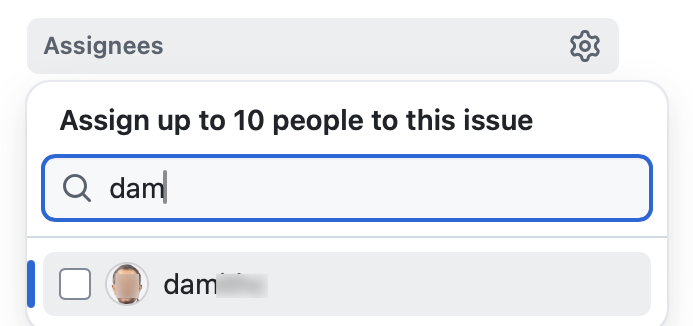
- Assignee(s): Assign to the issue team member(s) responsible for the bug. If no one is assigned, we consider the whole team as responsible for it.
- There is no need to actually fix the bug though. It's simply an indication/acceptance of responsibility. The penalty for the bug (if any) will be divided among the assignees e.g., if the penalty is -0.4 and there are 2 assignees, each member will be penalized -0.2.
- If it is not easy to decide the assignee(s), we recommend (but not enforce) that the feature owner should be assigned bugs related to the feature, Reason: The feature owner should have defended the feature against bugs using automated tests and defensive coding techniques.
- It is also fine to not assign a bug to anyone, in which case the penalty will be divided equally among team members.
- You may need to type the GitHub username of a member for it to appear in the assignee list.
- Acceptance status: Apply exactly one
response.*label (if missing, or if there are multiple such labels, we assign:response.Accepted)
Response Labels:
response.Accepted: You accept it as a valid bug.response.NotInScope: It is a valid issue, but fixing it is less important than the work done in the current version of the product e.g., it was not related to features delivered in v2.1 or lower priority than the work already done in v2.1.response.Rejected: What tester treated as a bug is in fact the expected and correct behavior (from the user's point of view), or the tester was mistaken in some other way. Note: Disagreement with the bug severity/type given by the tester is not a valid reason to reject the bug.response.CannotReproduce: You are unable to reproduce the behavior reported in the bug after multiple tries.response.IssueUnclear: The issue description is not clear. Don't post comments asking the tester to give more info. The tester will not be able to see those comments because the bug reports are anonymous.
Only the response.Accepted bugs are counted against the dev team. While response.NotInScope are not counted against the dev team, they can earn a small amount of marks for the tester. The other three do not affect marks of either the dev team or the tester, except when calculating bonus marks for accuracy.
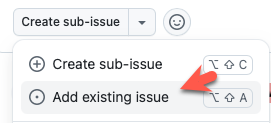
Duplicate bugs: To mark an issue as a duplicate of another, mark one as a sub-issue of the other using the GitHub sub-issue feature (
Create sub-issue→Add existing issue).
- For each group of duplicates, all duplicates should be marked as sub-issues of one original i.e., no multiple levels of sub-issues.
- If the duplication status is eventually accepted, all duplicates will be assumed to have inherited the
type.*andseverity.*of the original issue (i.e., all sub-issues will be given the labels of the parent issue automatically, even if sub-issues have different labels).
Bug type:If you disagree with the original bug type assigned to the bug, you may change it to the correct type.
Type labels:
type.FunctionalityBug: A functionality does not work as specified/expected.type.FeatureFlaw: Some functionality missing from a feature delivered in v2.1 in a way that the feature becomes less useful to the intended target user for normal usage. i.e., the feature is not 'complete'. In other words, an acceptance-testing bug that falls within the scope of v2.1 features.
These issues are counted against the product design aspect of the project. Therefore, other design problems (e.g., low testability, mismatches to the target user/problem, project constraint violations etc.) can be put in this category as well.
Features that work as specified by the UG but should have been designed to work differently (from the end-user's point of view) fall in this category too.type.DocumentationBug: A flaw in the documentation e.g., a missing step, a wrong instruction, typos
- If you assign more than one type label, we'll pick one of them at random. If there is no type label, we will revert back to the one given by the tester.
- If a bug fits multiple types equally well, the team is free to choose the one they think the best match.
- Bug severity: If you disagree with the original severity assigned to the bug, change it to the correct level.
Bug Severity labels:
severity.VeryLow: A flaw that is purely cosmetic and does not affect usage e.g., a typo/spacing/layout/color/font issues in the docs or the UI that doesn't affect usage. Only cosmetic problems should have this label.severity.Low: A flaw that is unlikely to affect normal operations of the product. Appears only in very rare situations and causes a minor inconvenience only.severity.Medium: A flaw that causes occasional inconvenience to some users, but they can continue to use the product.severity.High: A flaw that affects most users and causes major problems for users. i.e., only problems that make the product almost unusable for most users should have this label.
When applying for documentation bugs, replace user with reader.
- If there are multiple severity labels, we choose the lowest one. If there is no severity label, we revert to the one assigned by the tester.
- Justification: Add a team response comment, justifying your response. This comment will be communicated to the tester (who will then add their own counter-response) and will be considered by the teaching team in later phases (when resolving disputed bug reports).
- Give your teams response as a single comment, starting with a line that has the text
# T(# space T). Example:
Markdown text:# T We don't agree with the severity because ... We think fixing this bug is out of scope because ...T
We don't agree with the severity because ...
We think fixing this bug is out of scope because ...
- You must add a team response comment justifying your stance, for all the following cases:
- downgrading severity
- non-acceptance of a bug
changing the bug type(no need to justify this)- non-obvious duplicate
- If you don't provide a justification and the tester disagrees with your response to the bug, the teaching team will have no choice but to rule in favor of the tester.
- You may use issue comments to discuss the bug with team members.
If there are multiple comments in the issue thread, we will take the latest comment that starts with# Tas the team's response.If there aren't any comments starting with.# T, we will take the latest comment as the team's response
- Give your teams response as a single comment, starting with a line that has the text
- As far as possible, choose the correct
type.*,severity.*,response.*, assignees, and duplicate status even for bugs you are not accepting. Reason: your non-acceptance may be rejected in a later phase, in which case we need to grade it as an accepted bug.
If a bug's 'duplicate' status was rejected later (i.e., the tester says it is not really a duplicate and the teaching team agrees with the tester), it will inherit the response/type/severity/assignees from the 'original' bug that it was claimed to be a duplicate of.
Suggested workflow:
- Give a deadline for team members to self-assign bugs they voluntarily take responsibility for.
- After the deadline, assign the remaining bugs based on team consensus (e.g., discuss through a team meeting).
- Optionally, review how team members have responded to the bugs assigned to them, and providing suggestions on their choice of
response.*label and justifications.
- Must read: Guidelines for bug triaging is given below:
- In addition, you can also refer to PE grading guidelines given below:
PE Phase 3: Tester Response
In this phase you will receive the dev teams response to the bugs you reported, and will give your own counter response (if needed). Done during Wednesday - Friday period after the PE.Start: Within 1 day after Phase 2 ends.
Within 24 hours of the end of phase 2, comments will be added to the bug reports in the same issue tracker you reported bugs, to indicate the response each received from the receiving team.
Deadline: Fri, Nov 14th 2359. Strongly recommended to finish early, by 6pm on that day (reason: we will be sending out a status update email at 6pm -- if there are any discrepancies, you can still rectify them before the hard deadline).
Don't get upset if the dev team did not fully agree with most of the bugs you reported. Some may have provided arguments against your bug reports that you consider unreasonable; not to worry, just give your counterarguments and leave it to the teaching team to decide (in the next phase) which position is more reasonable.
However, if the dev team's argument is not too far from 'reasonable', it may be better to agree than disagree.
Reason: an incorrect counterargument at this phase will lower your accuracy more than an incorrect decision made during the testing phase, since you now have more time to think about the bug, i.e., changing your position after having more time to consider it and after seeing more information is encouraged, compared to sticking to your initial position 'no matter what'.
- If a bug reported has been subjected to any of the below by the dev team, and you don't agree with their action, you can record your objections and the reason for the objection.
response.*: bug not acceptedseverity.*: severity downgradedduplicate: bug flagged as duplicate (Note that you still get credit for bugs flagged as duplicates, unless you reported both bugs yourself. Nevertheless, it is in your interest to object to incorrect duplicate flags because when a bug is reported by more testers, it will be considered an 'obvious' bug and will earn slightly less credit than otherwise)type.*: bug type changed
No action is required for a bug if,
- none of (a), (b), and (c) above applies to it.
- you have no objections to the actions taken by the dev team on it, w.r.t. (a), (b), (c)
- the bug was not selected to send to the dev team in the first place.
When the phase has been announced as open, go to your PE bug reporting issue tracker.
For each issue, check the comment posted by our script, informing you of the team's response. If there is any aspect that needs your input, they will be listed under the heading Aspects You Can Object To:
- If the team has downgraded the severity and you agree with the downgrade, no action needed. If you disagree, explain your objection using exactly one comment, starting with the line
# S(# space S)e.g.,# S I don't agree with the severity downgrade because ... - If you don't agree with the team's
response.*, explain your objections in a similar but separate comment starting with the line# R. - If the team has indicated the bug as a duplicate of another, but you don't agree with it, explain your objections in a comment starting with the line
# D. - If you wish to update your objections, you may edit the one you previously added.
- If the team has downgraded the severity and you agree with the downgrade, no action needed. If you disagree, explain your objection using exactly one comment, starting with the line
Do not,
- change the subject, labels, or the description of the original issue.
- edit the labels (i.e., text/colour) that we have provided, add new labels to the repo, or delete labels in the repo.
- close bug reports, or reopen bugs you previously closed.
If you do not respond to a dev response, we'll assume that you agree with it.
If you would like to revise your own initial type/severity in response to the team's inputs, you can state that in your explanation e.g., you rated the bug
severity.Highand the team changed it toseverity.Lowbut now you think it should beseverity.Medium(do not change the original labels yourself though).
Similarly, if the bug was rejected, but you think it should beNotInScope, you can disagree with theirresponse.Rejectand give your reasoning why it should beNotInScope.You can also refer to the below guidelines, mentioned during the previous phase as well:
- If the dev team disagreed with an aspect (i.e., /severity/) and you now agree with the dev team's position, it will not hurt your accuracy rating. Here are some examples (for the
severity.*):
| Tester choice | Dev choice | Tester reaction | Teacher decision | Dev accuracy | Tester accuracy |
|---|---|---|---|---|---|
High | agreed | ||||
High | Low | agreed | no effect | ||
High | Low | disagreed | High | ||
High | Low | disagreed | Low |